
So, you want to start a blog. That’s a great idea! If you’re unsure where to begin, you’re not alone. Many new bloggers feel overwhelmed by the options and steps involved. This guide will walk you through the essentials in clear, practical steps so you can launch your blog with confidence.
I began blogging long before it became mainstream, and my progress was gradual. You don’t need to move at a snail’s pace—if you have ideas and energy, you can get started quickly and effectively. Let’s get going.
(This article may contain affiliate links; see my disclosure for details.)
I’ve been asked many times for a straightforward, beginner-friendly guide to blogging. There’s a lot of information online, sometimes too much. This article breaks the process down into three simple steps so you can start from the very beginning and move forward without confusion.
STEP ONE: Name Your Blog
Your blog name is your domain. Choose a name that reflects what your blog will cover and is easy to remember and spell. That helps readers know what to expect and makes it easier for them to return.
If you’re still brainstorming, a planning worksheet can help clarify your focus and generate name ideas. When you register your domain through a hosting provider like Bluehost, the domain may be free with certain plans.
When picking a domain, try multiple variations if your first choice is taken. Be patient and creative—eventually you’ll find a memorable name that’s available.
STEP TWO: Set Up Hosting
Being self-hosted is an important step if you plan to monetize your blog. Self-hosting gives you control to add affiliate links, ads, and any plugins you need. It also lets you customize your site’s appearance using themes and design tools.
Self-hosting costs money, but it’s affordable. Many new bloggers start with budget-friendly plans from well-known hosts. A reliable host will also offer a money-back guarantee if you decide blogging isn’t for you within a set period.
When signing up, you’ll be presented with optional add-ons. Most are not essential for a new blog—skip extras you don’t need. One useful option to consider is Domain Privacy Protection, which helps keep your contact details private for a small fee.
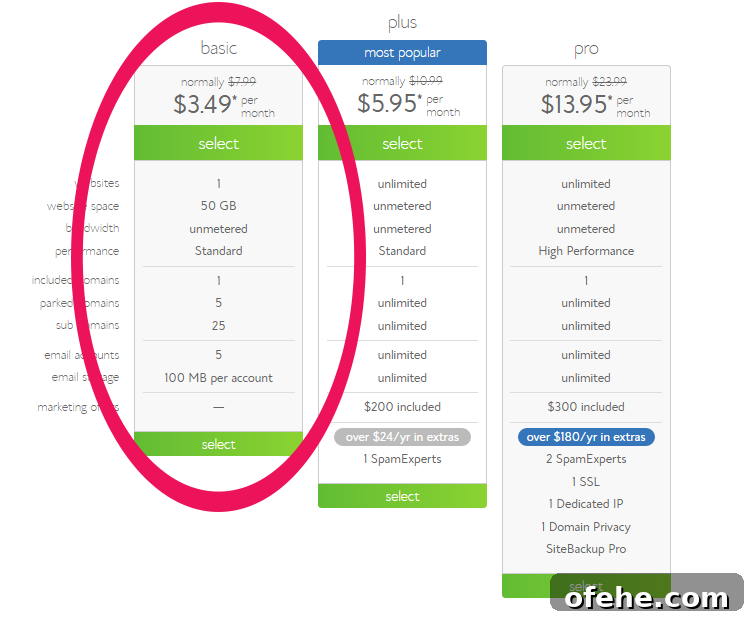
To get started with a host, look for a clear “Get Started” or “Sign Up” button, follow the prompts to enter your domain, and choose the plan that fits your needs. If your desired domain is already taken, try variations until you find a good match.
STEP THREE: Set Up Your Blog
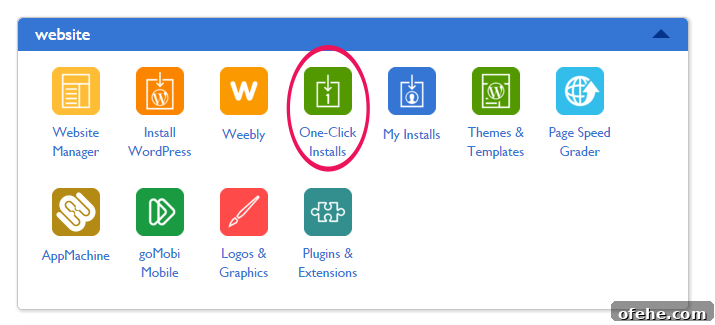
After purchasing hosting, log in to your hosting account and locate the control panel (often called cPanel). Look for a one-click installer for popular platforms—WordPress is the most widely used for blogs and is beginner-friendly.
Run the one-click install for WordPress. The host will guide you through the final steps. Once installation is complete, you can log in to your WordPress dashboard to begin customizing your blog.
Next, give your site a look and feel by applying a theme. In the WordPress dashboard, go to Appearance > Themes to browse free and premium options. Themes control your site’s layout and design—pick one that supports the features you want and looks professional.
Next Steps and Resources
Once your blog is live and themed, you can focus on writing quality content, setting up essential pages (About, Contact, Privacy Policy), and learning basic SEO practices to help readers find you. There are many resources and courses available that walk through traffic strategies, monetization, and blog growth—consider trusted guides and training programs to accelerate your progress.
MORE GOOD READS:
4 Things Every New Blogger Must Do
The Fastest Way To Make Money From A Small Blog
Starting a blog is an exciting journey. Choose a strong domain name, secure reliable hosting, install WordPress, pick a theme, and start creating valuable content. With consistent effort and the right tools, your blog can grow into something meaningful and successful. Good luck—happy blogging!